 WORK IN PROGRESS - ValkyrieSkies
This guide might appear daunting at first, but it doesn't have to all be consumed at once. Consider reading each section as it's relevant to you and you will likely find it a more comfortable read.
New Player Guide

Welcome to Trace/ALTER, a persistent roleplaying world set in a cyberpunk world of cut-throat corporate espionage intermingled with supernatural horrors. Whether you're entirely new to this genre of game or you've tried your hand at a few in the past, this guide aims to help you get acquainted with everything you need to know to enjoy the world of Trace/ALTER.
Key Things To Note
- Trace/ALTER is a roleplaying mandatory game.
- Messages sent through the chat window and roleplay prompt are considered IN-CHARACTER, which is to say they should be from the perspective of your character and how they would act/react in that current moment. You should not send messages acknowledging that your character is in a game or which only make sense with meta knowledge beyond what your character would know. If you need to communicate out of character information, write your message into the chat bar enclosed within parenthesis like (this) and your message will be sent as a LOOC (Local Out-Of-Character) message which can be seen by all nearby characters. If you are facing a severe issue, then you can contact admins directly via the Admin Help button in the Options menu (accessible via pressing Escape or clicking the wrench icon on the bottom left toolbar in-game).
- Character death is a very real and present possibility in Trace/ALTER.
- You should not make a character with the expectation that they will never die and you will have full control over the direction their story will go. If you make enemies of powerful individuals or foolishly wander into somewhere incredibly inadvisable, you may find yourself meeting an abrupt end. You should not let this discourage you however - at Roleplay Levels (RPP) 80, 160, and 240, you will earn a Shounen Token, a special token which can be consumed to avoid a death and thus give you the opportunity to seek a more fitting finale for your character, and even if your character does end up dead you will earn Generations Points (GPP) which can be spent on background traits to make your next character even more formidable than the previous.
- Owing to the game's combat system, player vs player combat (PvP) can be quite a timely affair.
- If you are in a situation which is likely going to lead to blows but you don't have the time to commit to it, it is best to explain so to the other player via LOOC and arranging an alternative end to the scene or planning to play it out at a future time instead. If a polite arrangement cannot be reached, it may be advisable to request an admin ruling.
- Time passes in-game at a rate of 1 in-game year per 14 real world days and this will be reflected on your character's age.
- Once you reach old age, your character's stats will begin to decline, so having your character start at age 60 or beyond may severely limit the window of time in which your character is effective in combat. Still, should you have an elderly character concept you wish to play you should not let this deter you, it is simply a mechanic to be aware of.
- Read the rules.
- Ignorance will not be an acceptable defence for particularly egregious rule breaks.
Creating Your Character
Character Concept
The first thing to consider when creating your character is the actual concept of your character in question. Getting acquainted with the most essential lore of the setting is the best place to start in consideration of this - chiefly the setting of Cascade City and the nature of the useful yet highly dangerous magical force known as TRACE. Additionally, you should keep in mind that your character will be very weak when they are first created. There is a time-based limit to how fast you can progress and as such you shouldn't create a character who you wish to immediately be considered a powerful and influential individual within the world of the paranomalous.
Here are some simple hooks for new characters which make for an easy introduction to the setting:
- You are a regular citizen who has just awoken as a TRACE Sensitive and someone in the know has directed you to get in contact with the Tracer Order, the secret society who maintains the fragile balance of this new magical world and can teach you how to use your unstable newfound powers.
- You are a low-level corporate agent - perhaps you work for the Ascension Group, keeping tabs on the supernatural happenings of the city, or perhaps you work for another corporation entirely, seeking to acquire intel on your competitor and smuggle out information and experimental technology.
- You have always had an interest in the occult and magical (perhaps having even had an encounter with it yourself) and your research and explorations of the topic on the internet always seems to bring up Cascade City. Deciding to go out on a limb, you've decided to invest in a cheap living space in Cascade (perhaps even moving from abroad) to discover just what is going on in this bizarre city-state.
These are simply some basic story hooks with which to give your character direction, but there are other considerations you should give to your character. What socio-economic background do they come from? In what way did their youth shape them? How do they feel about other people? If they aren't from Japan, how did they or their family end up there and how well was their experience with acclimatising to this radically different nation? By having answers to questions like these, playing your character will come to you far more naturally and it will help them feel much better realised and interesting to interact with.
In-Game Character Creation

Once you have a solid idea of who your character is, it's time to actually create them in-game. By pressing the New Character button on the game's splash screen, you will be taken to the character creation screen. Here you can set your character's name, age, body type, and visual appearance. Clicking your character will rotate their sprite so you can see how they look from various angles. Clothing is acquired as equipment in-game so do not worry about them just yet. Other than hairstyle, these parameters can not be easily changed without admin intervention, so it is advisable to be certain about your choices before you proceed. Once you have completed this stage of character creation, you will then be asked which district you wish to spawn in. This choice will determine the location of your character's starting apartment which will serve as their respawn point.
Once you have chosen your starting district, you will be sent to your apartment and can now begin to play the game!
Getting Started In-Game
Core Controls
| Keys | Function |
|---|---|
| WASD | Movement |
| Escape | Open options menu/close pop-up windows |
| I | Inventory/Stats |
| Z | Meditate to restore health outside of battle |
| Shift | Hold to sprint |
| Tab | Open/close chat window |
| Right-Click | Opens context menu for highlighted object when applicable |
Your Apartment
Assuming nothing goes wrong, you should now be in control of your character in your apartment. Your apartment will serve as your respawn location should you ever be defeated in combat and subjected to a respawn timer (such as being defeated by a non-lethal enemy such as an ooze). To access your apartment after leaving, you need simply walk up to the elevator in the lobby of the building your apartment is located in and use the Apartment/Dorm Key item from your inventory. If you wish to create more copies of your key, you can do so by right-click interacting with the door of your apartment while inside (as well as edit some other details about it), but be aware that if other players get their hands on your key then your apartment may no longer be a private or safe space.
The game will start you with a few pieces of furniture to get you started with your apartment;
- Bed - This is probably the most important piece of furniture in your house; once every 2 hours you can sleep in a bed to restore a large amount of Energy and Sanity as well as clearing fatigue which prevents you restoring energy via roleplaying.
- SABLE Holopad - When interacted with, this device summons a holographic AI-powered NPC. By double clicking on SABLE's holographic avatar, players can post messages and have them be responded to by the AI. The primary purpose of this is to provide players with an easy and private avenue through which they may experiment with the game's chat system and their character 'voice' so to speak, as well as an extra avenue to earn Activity for the game's progression system should there be no one around. As SABLE is powered by generative AI, players should take her words with a grain of salt as she will likely no actually have accurate answers in regards to the game world at large, especially if the current narrative is primarily one born of player actions.
- Random furniture boxes - In addition to the above two items, the player's apartment should contain approximately 3 boxes of a random furniture item each. These boxes can be picked up with alt-click and then the furniture placed down by left clicking the furniture item from the player's inventory then left clicking where in your living space you wish to place it.
To purchase furniture, you can open the catalogue by pressing the blue couch icon at the bottom-left of the screen, however as you will start the game with very little money it's inadvisable to do this right now. Furniture placed down in your apartment can be added back to your inventory by holding Alt and left-clicking on it.
The Chat System
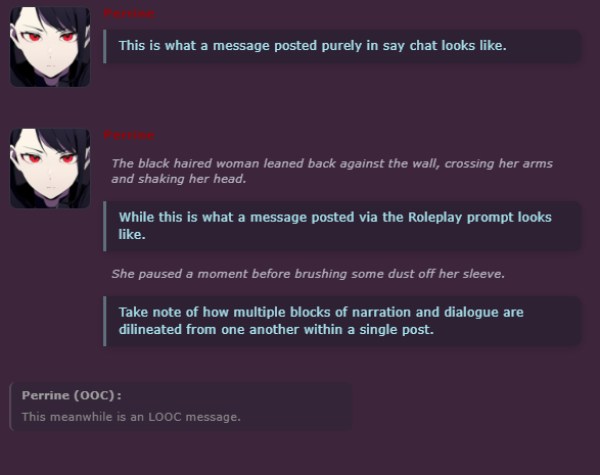
The chat system is the primary method of communication and non-combat expression within the game world. There are two primary ways of using the chat system; the standard single line text box at the bottom right can be used to post messages that are purely spoken words (often referred to as Say chat), while pressing the 'Roleplay' button beside it will open a pop-up window which can be used to make more intricate posts which include both narration and spoken words (enclose them in quotes for proper formatting). Messages in say chat can also be sent as Local Out-Of-Character (LOOC) by enclosing them in parenthesis. LOOC should be used for communicating problems, out of character questions, or otherwise non-roleplay based friendly banter between players.
The SABLE Holopad that every apartment starts with is a perfect way for you to get acquainted with the usage of the chat system as mentioned above.
Chat Commands
The chat system also features a number of special commands which can be used by the player via typing them in say chat (these will not function in the roleplay prompt window).
| Command | Function |
|---|---|
| /help | Lists out all chat commands and their parameters. |
| /stats or /record | Lists out a number of statistics pertaining to your current character. |
| /reward | Manually trigger the check for your daily RPP reward. It is best to do this only after reaching 100% activity to receive a larger reward than the single point you'll receive otherwise. |
| /respec | Allows you to reset all your stats and skills for free. Only usable before obtaining a backstory. |
| /afk | Set your status to “away from keyboard”. |
| /ai | Toggles your ability to spend AI tokens on and off. |
| /powerlevel [stat] [magnitude] | Reduces a stat of your choosing to a percentage of its usual value. If no stat is chosen, it will reduce your damage instead. |
| /surrender | Instantly knocks your own character unconscious. After bring unconscious for 5 minutes, the player is teleported to their starting apartment. |
| /bountyhunters | View the bounty hunter leaderboard. |
| /roll [x]d[y] | Allows the player to roll X number of Y-sided dice. Also supports addition/subtraction, e.g: /roll 1d20+4 |
| /coinflip | Flips a coin. |
| /w [message] | Communicate via whisper. Only players in the immediate proximity of your character can hear whispers. e.g: /w I don't think that guy can be trusted… |
| /h [message] | Speak over your equipped headset. |
| /r [message] | Speak over a nearby radio or walkie-talkie. |
| /n [message] | Communicate via neural link. This requires your character to have a Xenogen Neural Implant installed. |
| /(portrait) [message] | Switch to and send a message as one of your saved portraits. |
Customising your Character
From here, there are now two main avenues beyond equipment to further customise your character; your profile, and your mechanical features.
Profile and Face icons
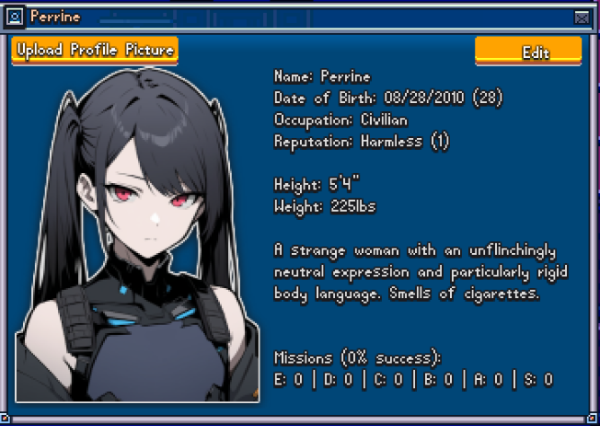
You can open your character's profile by either right-clicking their sprite and pressing 'View Profile', or by simply holding Ctrl and left-clicking their sprite. From here, you can add a link to an image hosting online to serve as the primary reference for their appearance as well as type in details such as their height, weight, and a short description. Descriptions should only be about observable details about the character - their appearance, their demeanour, how they speak, how they move, etc. Descriptions generally should not confer information about the character's history, relationships, or other such details someone who didn't know the character would know.
Note about images: Due to anti-hotlinking measures, using Discord to host your images will not work in-game once the access token expires. We recommend using dedicated image hosts such as catbox.moe. For profile images, the ideal image is a chest-up portrait of dimensions 270x370px. For face icons, the ideal image is a close-up of the character's face of dimensions 200x200px. Transparency is supported by both profile images and face icons. All images uploaded are subject to the terms laid out in the rules.
Mechanical Features
Stats and skills are the primary things which define your performance in combat and your ability to interact with certain gameplay systems and mechanics. Stats define your character's ability levels in terms of things such as their max HP, their maximum TRACE pool, how many tiles they can move in combat, how much damage they deal with attacks, and so on. Skills meanwhile are passive abilities which modify certain aspects of your character or active abilities which can be used in combat or outside of combat. Stats can be purchased with Stat Points while Skill can be purchased from Skill Trees with Skill Points (SP). Both are earned whenever you earn Roleplay Points (RPP) or Levels, discussed later.
Stats
Main Article: Stats
There are 5 stats the player can invest in: Strength, Agility, Intelligence, Speed, and Vitality. The function of each stat is listed on the table below.
| Stat | Description |
|---|---|
| Strength | Used to determine the power of unarmed attacks and a number of weapons. Grants additional inventory slots. |
| Agility | Used to determine the power of a number of weapons. Grants a small initiative bonus. |
| Intelligence | Used to determine the power of magical attacks and a number of weapons. Increases the user's maximum TRACE. |
| Speed | Increases the amount of tiles a character can move in combat and grants an initiative bonus. |
| Vitality | Increases max HP and grants bonus physical and magical damage reduction. |
The default stats used by each weapon type can be found listed on the weapons page.
As a new character, it will likely be most beneficial to primarily put points into Vitality at first, followed by putting a smaller amount into the stat associated with the weapon type you intend to use. Speed will become an important stat later, but achieving a baseline level of survivability should be your first priority.
Skills
Main Article: Skills
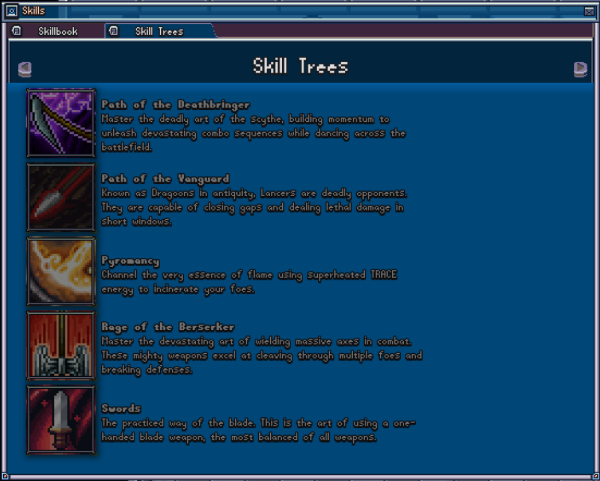
Skills are a more direct aspect of your characters capabilities - these represent your character's proficiency with certain weapons, their aptitude with particular magical disciplines, and their expertise in certain professional fields. Skills can be purchased from their associated skill trees from the skills menu which can be accessed via clicking the shuriken icon on the bottom-left toolbar. As a new character, it's likely going to be most beneficial to start by unlocking a weapon proficiency to begin making immediate progress on attaining a means to defend yourself. While you could aim to take a magic tree first, this will take longer to get you to a state of being combat capable as magic skill trees will generally have higher upfront costs and thus take longer to become a viable means of self-defence.